In our previous episode, I discussed how I shaped our proprietary company application alongside my AI partner, Gemini, in just two weeks. This is the continuation of our journey, starting from the point where our on-site team could input daily logs and tomorrow's schedules directly from their smartphones.
If you haven't read Episode 1 yet, please start there:
An application doesn’t simply end with its creation.
Testing it live in the field, identifying glitches, and debugging repeatedly—it seemed like a smooth path forward.
Real Glitches from the Field and Days of Debugging
However, the real trial began here.
Once our technicians started using the app on-site, a steady stream of very practical feedback and requests came flooding in: "President, this button is hard to tap," or "Entering this item from a smartphone is tedious."
Because this was the very infrastructure they would rely on daily, I wanted to eliminate even the slightest friction from their perspective. With that resolve, I updated the app for every single piece of feedback, threw it back to the field saying, "I've fixed it, try it again!", and repeated this high-speed catchball of iteration over and over.
Through endless updates, the app evolved from Version 1.0 to Version 2.1 before we knew it.
Using the neatly consolidated "Daily Logs" and "Tomorrow's Schedule" data as our core, I even went a step further to develop a "Billing App" that seamlessly linked everything from tracking labor hours to generating client invoices.
But that was when we slammed into our next roadblock.
Confronting the "Limits of No-Code" with AppSheet
AppSheet is an outstanding tool that lets you build apps without writing a single line of code. Yet, precisely because of this, it came with "tool-specific limitations" and unique frustrations.
Specifically, we encountered the classic "fix one thing, break another" phenomenon.
In AppSheet, modifying one screen would often conflict with another setting on the back end, causing unexpected behavior. Or, when I wanted a specific, fine-tuned interaction, the lack of flexibility meant the platform simply wouldn't cooperate.
The flip side of "not having to write code" is that you are strictly bound to operate within the rigid rules determined by the tool.
Wrestling with setting screens to keep everything aligned on the back end became even more tedious and complex than writing actual code.
"...If that's the case, wouldn't we build a more precise, customized system if we just broke free from AppSheet's boundaries and wrote it ourselves using HTML and JavaScript?"
That was the sudden realization that changed everything.
Stepping into Custom Web App Development with Gemini
Building a custom web application from scratch with zero prior programming experience—normally, you'd ask, "How many years of study will that take?" But I had my AI partner, "Gemini."
I posed a direct question to the AI:
"I want to move away from AppSheet and build a web application from scratch using HTML and GAS (Google Apps Script). How do I start?"
The AI instantly provided a clear roadmap and an architectural blueprint.
From there, the speed of development was nothing short of miraculous. The screen design, the back-end logic, and the database integration—the AI assisted with everything.
By combining the code snippets generated by the AI and telling it to "fix this part, it's not working right" whenever a bug appeared, I was able to build the application with astonishing ease.
Once we transitioned to this "AI x Web App" approach, our proprietary systems multiplied exponentially.
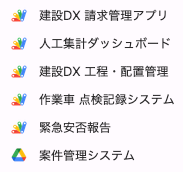
As shown in the image, we rapidly brought to life not only project management and billing apps, but also daily labor tracking systems, a "Service Vehicle Inspection Record System" to ensure on-site safety, and an "Emergency Safety Reporting System" for unforeseen disasters.
Achieving Our Dream: The Intuitive "Scheduling & Labor Assignment App"
Among all of these, the one that brought the greatest sense of achievement was the "Scheduling & Labor Assignment App."
For an electrical contracting firm, deciding who goes to which site each day is a monumental task. Historically, we had managed this entirely via Excel.
By turning this into a web application, I was able to implement a feature I had dreamed of for years: a drag-and-drop interface where I could visually and intuitively move workers' names across different job sites.
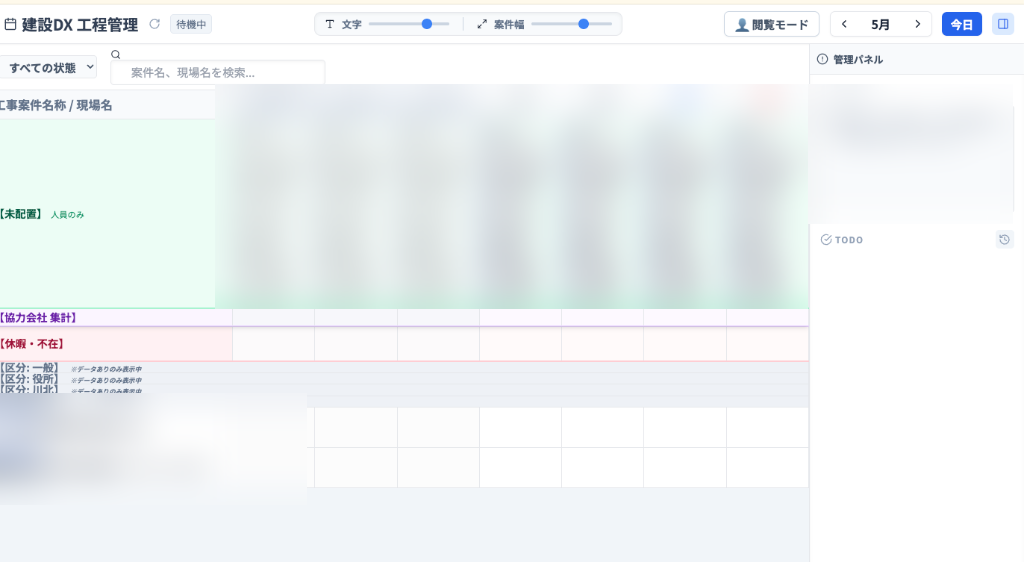
In the past, our only options were to outsource such development at massive expense or force ourselves to fit into off-the-shelf software. Seeing us rapidly insource all of this with the power of AI made me realize what an incredible era we now live in.
By pushing AppSheet to its absolute limits based on employee feedback, and then leaping forward into custom web applications, our digital transformation has truly ascended to a whole new level.
Yet, my passion for creation did not stop there.
Having tasted the immense utility of custom web apps, I decided to venture into a brand-new "territory" in search of even smoother, more professional data processing capabilities.
---
▶︎ Representative Column Episode 3